Email With Your Own Domain: The Cheapest Legit Ways (2026)
The cheapest legitimate way to get email at your own domain is free, if all you need is to receive it. Cloudflare Email Routing or ImprovMX's free plan will forward [email protected] to an inbox you already use. If you need a real mailbox you can send from, Zoho Mail's Forever Free plan covers up to five people on the web and its apps. Standalone paid mailboxes start at $1 per user per month with Zoho Mail Lite. Most hosting plans already include a mailbox or two, and the full office suites run about $7 per user per month at Google Workspace or Microsoft 365. Every price here is in US dollars, checked on vendor pages on 9 and 10 October 2026.
Which one is right depends on two questions, not on brand. Do you need to send from the address, or only receive? And do you need it on a desktop mail app, or is a browser enough? Answer those and the choice usually makes itself. This guide prices every route, shows the DNS records that make each one work, and flags the limits that the free plans put in small print.
The cheapest ways to get email on your own domain, ranked by cost
Here is every route we'd consider for a personal site or small business, from free forwarding to a full suite. 'Send as' means you can write a new message that genuinely comes from [email protected] and passes the checks receiving servers run, not just reply from your personal address.
| Route | Price per mailbox | Send as your domain? | Storage | The catch |
|---|---|---|---|---|
| Cloudflare Email Routing | Free on all plans | No: receive and forward only | None (forwards to your inbox) | Your domain must use Cloudflare DNS; 200 routing rules per domain |
| ImprovMX Free | Free | No: SMTP sending needs a paid plan | None (forwards) | 1 domain, 25 aliases, 500 forwards a day |
| Zoho Mail Forever Free | Free | Yes | 5 GB per user | Up to 5 users, 1 domain, web and app only (no IMAP/POP); not offered in every data centre |
| Zoho Mail Lite | $1/user/mo (5 GB) or $1.25 (10 GB), billed yearly | Yes | 5 or 10 GB | No monthly billing option |
| Mailboxes with your hosting (Hostinger Premium example) | 2 per website free for year 1, then $0.59/mo each on a 12-month term | Yes | 1 GB per mailbox | Tied to your hosting account |
| Namecheap Private Email | $14.88/yr on Launch (1 mailbox) after a 30-day free trial; extra mailboxes $8.88/yr | Yes | 5 GB on Launch | Billed yearly; ask for a refund within 7 days of a charge |
| Microsoft 365 Business Basic | $7/user/mo paid yearly ($8.40 monthly) | Yes | 100 GB mailbox | Web and mobile Office apps only |
| Google Workspace Business Starter | $7/user/mo on an annual commitment; intro offer $4.90 for new customers | Yes | 30 GB pooled per user | Intro offer covers the first 20 users; its length is stated inconsistently |
| Proton Workspace Standard | $12.99/user/mo billed yearly ($155.88) | Yes | 1 TB per user | Priced for privacy, not budget |
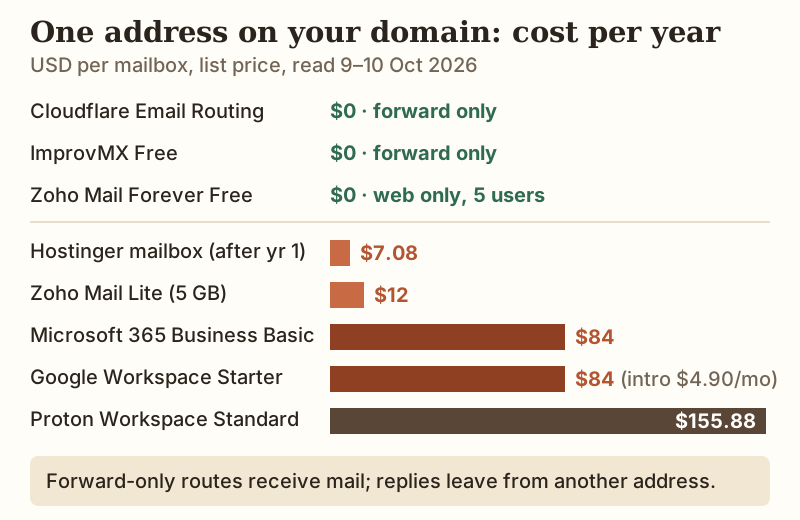
The chart shows a gap that matters more than any single price. Everything below $15 a year is either forwarding or a basic mailbox. Everything around $84 is a mailbox bundled with an office suite, video calls and shared storage. If you'd never open the word processor, you're paying mostly for software you won't use. A one-person site rarely needs the suite on day one. A five-person business that already lives in shared documents probably does.
Forwarding-only: free, but sending is the catch
Forwarding is the lightest setup there is. You publish an MX record that points your domain's mail at a forwarding service, and it passes each message on to the Gmail or Outlook inbox you already check. Cloudflare Email Routing is free on every Cloudflare plan and adds the MX, SPF and DKIM records for you. Its limits are generous for one person: 200 routing rules per domain, 200 destination addresses per account, and messages up to 25 MiB. The condition is that your domain must use Cloudflare's DNS. ImprovMX's free plan works with any DNS host but caps you at one domain, 25 aliases and 500 forwarded emails a day.
Neither free plan sends mail for you. Cloudflare's routing product only receives; outbound sending is a separate Email Sending product, in beta on the Workers Paid plan when we checked. ImprovMX's free tier includes no SMTP sending at all, and its Light plan at $50 a year adds 750 sent emails a month. In practice, a reply from a forwarding-only setup leaves from your personal address unless you add a sending service. Forwarding suits a contact address on a portfolio, a domain you're holding, or a catch-all that collects sign-up mail. It's the wrong choice if customers will see your replies.
A free real mailbox: Zoho Mail Forever Free
If you need to send as well as receive and you'd rather pay nothing, Zoho's Forever Free plan is the one genuinely free hosted mailbox we found. One domain, a maximum of five people, and 5 GB of storage apiece. The limits are real, though. Access is through Zoho's web interface and its own apps only, with no IMAP, POP or ActiveSync, so you can't add the account to Apple Mail or Outlook. Zoho also says the free plan is only available in selected data centres, so whether you can sign up depends on your region. Upgrading is cheap: Mail Lite costs $1 a head each month for 5 GB, or $1.25 for 10 GB. There's no monthly option, though, and once you upgrade, every user is billed, not just the newcomers.
Mailboxes that come with your hosting
Before paying for email separately, check what your hosting plan already includes, because most shared plans ship with mailboxes. Hostinger's Premium plan bundles two 1 GB mailboxes per site at no charge for twelve months. After that, each mailbox renews at $0.59 a month on a 12-month term, or $7.08 a year. Its Unlimited plan raises that to unlimited mailboxes for the first year. DreamHost's Launch plan includes 20 mailboxes free for three months, after which they become paid. IONOS's Web Hosting plans list between one mailbox (Essential) and five (Ultimate).
Host email is convenient, and for a site that already pays for hosting it's often the cheapest real mailbox. It has two weaknesses. First, the mail lives on the same account as the website, so if you move hosts, your email has to move too, and the free period's end date is easy to forget. Second, shared-hosting mailboxes are usually small and basic. That's fine for a contact address and tight for years of attachments. If you expect to switch hosts, a mail service independent of your hosting saves a migration later. The same independence argument applies to the domain itself, as our domain and hosting guide explains.
Namecheap Private Email — mail from your registrar
Registrars sell email too, and it's a sensible middle path when your domain already lives there. Namecheap's Private Email comes with a 30-day free trial on every plan, so you can set it up and test deliverability before paying anything. After that, Launch costs $14.88 a year for one 5 GB mailbox, Expand $41.88 for three mailboxes and Scale $71.88 for five (read 10 Oct 2026). Extra mailboxes are priced per year too: $8.88 on Launch, $25.88 on Expand and $39.88 on Scale. If you cancel after a charge, Namecheap asks you to contact support within 7 days. The appeal is one account for the domain and the mail, without tying either to your web host.
Sponsored link to the provider’s own site. If you sign up we may earn a commission at no extra cost to you — and it never changes what we say about a provider’s renewal prices or whether you should buy the domain from them at all.
Paid suites: Google Workspace, Microsoft 365, Proton
The office suites are the default for businesses with several people, and their mailboxes are large. Google Workspace Business Starter lists at $7 per user per month on an annual commitment, with 30 GB of pooled storage per user and a 14-day trial. New customers were offered $4.90 a month for their first 20 users, though Google's page gave two different lengths for the offer, so check how long it lasts at checkout. Microsoft 365 Business Basic is $7 per user per month paid yearly, or $8.40 month to month. It comes with a 100 GB mailbox, but only the web and mobile versions of Word, Excel and PowerPoint; the desktop apps start at Business Standard. A version without Teams is $5.40 paid yearly. Proton Workspace Standard is $12.99 per user per month billed yearly ($155.88), with 1 TB per user and up to 15 custom domains, aimed at people who put privacy first.
Pick a suite when you need what comes with it: shared calendars, document collaboration, admin controls, or a provider your clients already trust. If it's just you answering enquiries, the suite's yearly cost is about seven times a Zoho Mail Lite mailbox ($84 against $12).
Setting MX, SPF, DKIM and DMARC
Whichever route you choose, the same handful of DNS records does the work, and you add them wherever your domain's DNS is hosted: your registrar, your web host, or Cloudflare. MX tells the world where to deliver your mail. SPF is a TXT record listing the servers allowed to send as your domain. DKIM is a TXT record holding a public key, so receivers can check that a message was signed by your mail provider and not altered. DMARC, published as a TXT record at _dmarc.yourdomain.com, sets your policy for messages that fail SPF or DKIM.
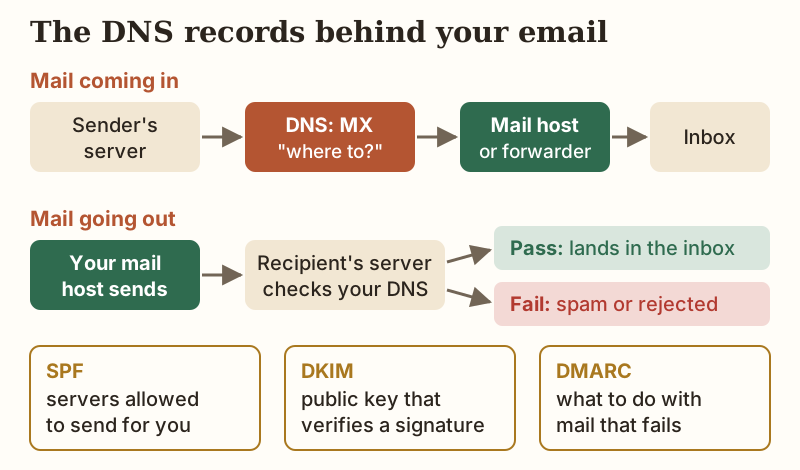
The order that avoids lost mail is simple. Create the mailbox or forwarding rules at your provider first, so it is ready to accept mail. Then add the provider's MX records and remove any old MX records that point elsewhere. Next, add SPF, and keep it to a single SPF record that includes every service that sends for you. The standard allows at most ten DNS lookups inside it, so stacking includes from several services can break it. After that, turn on DKIM in the provider's dashboard and paste its record into DNS. Finish with a DMARC record in monitoring mode (p=none), and tighten it only once your reports show legitimate mail passing. If your domain and hosting live in different places, the connect-a-domain guide shows where to find the DNS editor.
Which route for which person
If you only need people to be able to reach you at your domain, use forwarding. Cloudflare Email Routing if your DNS is already there, ImprovMX if it isn't, and accept that replies leave from your personal address. If you're a one-person business that needs to send as your domain, start with the mailboxes your host includes, or Zoho's free plan if a browser is enough. Then move to Zoho Mail Lite at $12 a year when you want more room. If a small team shares calendars and documents, a suite at $7 per user per month earns its price. If you'd rather keep mail with your registrar, Namecheap's 30-day trial lets you test it first.
Edge cases that catch people out
A few situations break email setups more often than price does. If your domain expires, your email stops with it, since MX records only work while the domain resolves, so keep auto-renew on and keep the registrar login on an address outside the domain. If you switch web hosts and your mail was on the old host, the MX records still point at the old server until you change them, so plan the mail move before cancelling. Pointing your MX records at a forwarding service takes incoming mail away from any mailbox already working on the domain, so don't switch on forwarding until you've decided where that mailbox's mail should go. And if you send newsletters through a separate service, add that service to your single SPF record and set up its DKIM. Otherwise the mail you most want delivered is the mail most likely to land in spam.
Custom domain email, answered
Can I get email with my own domain for free?
What is the cheapest paid email for a custom domain?
Do I need hosting to have email on my domain?
Can I send email from my domain using Gmail?
Which DNS records do I need for custom domain email?
Ready to get set up? See how to get a domain and hosting, or work out whether to buy them together or separately.