What Is Domain Hosting? DNS Hosting vs Web Hosting, Explained With One Diagram
Domain hosting is the service that keeps a domain name working on the internet: running the nameservers that answer when anyone looks the name up, and storing the records that say where its website and email live. The more precise name is DNS hosting. People also use "domain hosting" loosely for registering a domain, or for web hosting that comes with a domain, which is why the term confuses so many first-time buyers.
For most small sites, domain hosting costs nothing extra: your registrar or your web host includes it, and Cloudflare offers it free. Paid DNS hosting, such as Amazon Route 53 at $0.50 a month per domain plus a charge per query, is for people who want specific features, not a requirement. This guide untangles the three meanings, shows who hosts each layer behind your domain, and explains how to move your DNS without touching your website. Prices were read on vendor pages between 9 and 12 October 2026.
What "domain hosting" means: three different things
When someone says they need domain hosting, they usually mean one of three services. They overlap in marketing, but they are separate jobs and can be done by three separate companies.
- Domain registration. Renting the name itself, such as yourname.com, from a registrar for a year or more. This is what you renew every year to keep the name.
- DNS hosting. Answering the internet's questions about the name. The DNS host runs the nameservers and keeps the records: which server shows the website, which one receives email, and the text entries other services check.
- Web hosting. Storing and serving the website's files. A web host may include DNS hosting, and many add a first-year domain at no charge, which is how the three got blurred together.
When a hosting company advertises "domain hosting" as a product, it usually means DNS hosting bundled with registration. When a beginner searches "web domain hosting", they usually mean all three in one bundle. Neither is wrong; the point is to know which layer you are buying, because each one renews, breaks and moves differently. If the difference between a domain and a host is still hazy, our page on domain vs hosting covers that first.
The three layers behind every domain
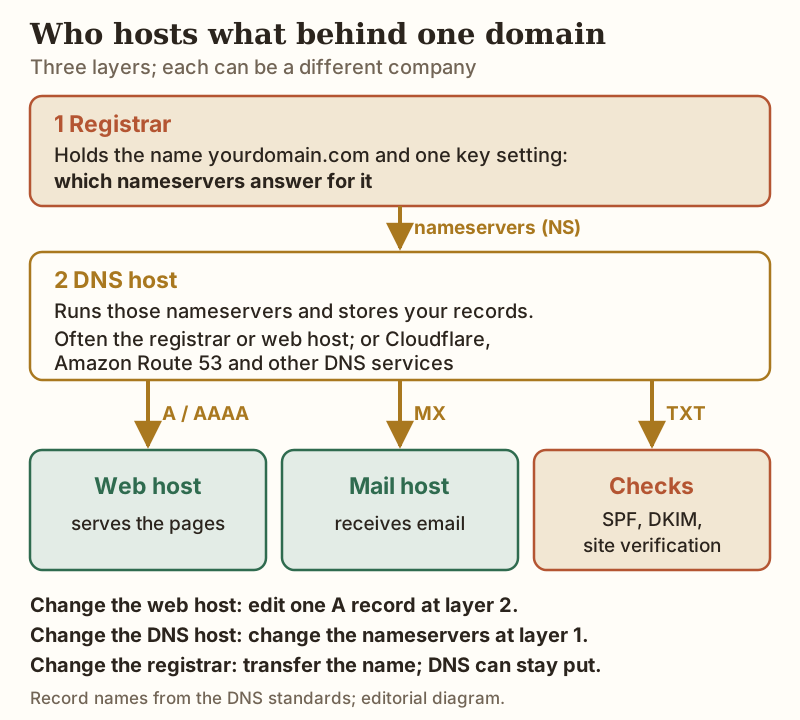
Read the diagram from the top. The registrar keeps one setting that controls everything below it: the list of nameservers for your domain. Whoever runs those nameservers is your DNS host, and only the records stored there count. The records then send each kind of traffic onward: A and AAAA records to the server with your website, MX records to whoever handles your email, and TXT records to prove ownership to services such as search consoles and to protect your mail from spoofing.
That structure explains the most useful fact about domain hosting: each layer can change without the others. Moving to a new web host means editing one record at the DNS host. Moving your DNS means changing the nameserver setting at the registrar. Transferring the domain to a cheaper registrar can leave your DNS exactly where it is. Keeping the registration in your own name, as our guide to who should own your domain explains, is what keeps all three moves in your hands.
Free vs paid DNS hosting
The table shows the DNS hosting options most small-site owners will meet, with what each costs and what limits apply. All are reliable enough for an ordinary website; the differences are in features, limits and how many companies you deal with.
| DNS host | Price | Limits and notes | Best for |
|---|---|---|---|
| Your registrar (e.g. Dynadot, Namecheap) | Included with the domain | Dynadot lists Advanced DNS Settings free with every .com; Namecheap's default is BasicDNS (30-minute default TTL), with a paid PremiumDNS tier | Keeping name and DNS in one account |
| Your web host | Included with hosting | Records live in the host's panel; if you leave the host, you must recreate them elsewhere | One bill for a first site |
| Cloudflare Free | $0 | Queries never metered; 200 records per zone for zones created since 1 Sep 2024; you must switch to Cloudflare's nameservers (full setup) | Free DNS plus Cloudflare's proxy and DDoS protection |
| Amazon Route 53 | $0.50 a month per hosted zone (first 25), plus $0.40 per million queries | Up to 10,000 records per zone; zones charged from the day created, not prorated | Sites already running on AWS; advanced routing |
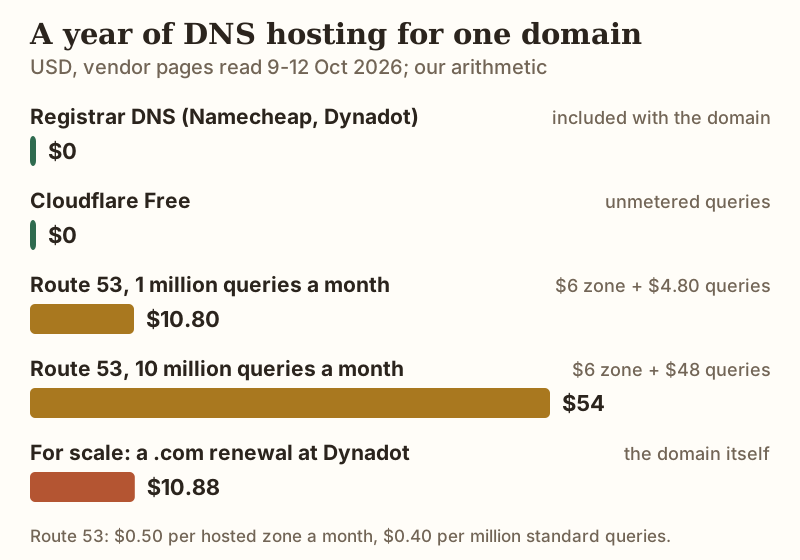
The arithmetic is simple. Route 53 charges $6 a year for the hosted zone, and a site whose name is looked up a million times a month adds $4.80 in query charges, for $10.80 a year: about what Dynadot charges to renew the .com itself ($10.88). At ten million queries a month the year comes to $54. Free options carry no such charge, and for a typical small site the paid features, such as latency-based or geographic routing, solve problems you do not have.
For most readers, the simplest good setup is DNS at the registrar where you renew the domain. Dynadot renews a .com at $10.88 a year with DNS included, and Namecheap includes its BasicDNS with every domain it registers. Move DNS to Cloudflare later if you want its free proxy in front of the site.
Moving your DNS without moving your website
Because DNS is a separate layer, you can move it on its own, for example from your web host's DNS to your registrar's, or to Cloudflare, while the website stays on the same server. The risk is a gap where some records are missing, which usually breaks email first. This order avoids it:
- Export or copy every record at your current DNS host: A, AAAA, CNAME, MX, TXT and any others. Email and verification records are the ones people forget.
- Recreate them all at the new DNS host before changing anything else. If the new host offers to import records automatically, check its list against yours line by line.
- Lower the TTL a day ahead if the old host lets you. AWS's guidance, for example, is to drop a record's TTL to around 300 seconds before a change and raise it again afterwards, so the switch spreads faster.
- Change the nameservers at your registrar to the new DNS host's pair. This is the only step that moves anything.
- Check, then wait. Look up your domain's NS and MX records from an online DNS checker. Leave the old DNS host's records in place for a few days, because some resolvers will keep asking the old servers until their cached answer expires.
Your website and mailboxes never move during any of this. If the records were copied correctly, visitors notice nothing. For the related job of pointing a domain at a new web host, see our walkthrough on connecting a domain to your host.
Common mistakes: nameservers vs records
- Editing records where they do not count. The classic: your nameservers point to your web host, but you edit the DNS page at your registrar. Nothing changes, because the registrar's records are not being consulted. Check which nameservers are active before you edit anything.
- Switching nameservers before copying records. Change the nameservers to an empty zone and your site and email go dark until you fill it in.
- Proxying the wrong record on Cloudflare. Proxied records work for websites; a mail or FTP hostname set to proxied stops working. Keep those DNS-only.
- Forgetting that DNS depends on the registration. If the domain expires, the DNS host's records stop mattering: registrars must interrupt DNS resolution during the last part of the post-expiry renewal window, and some park the domain on their own nameservers from the first day.
For anyone who wants the domain, DNS and a first website managed in one place, a host that bundles them is fine; Hostinger's Premium plan bundles registration, DNS and hosting, and waives the first year's registration fee on terms of 12 months or more. Check the domain's renewal price before you rely on that bundle.
Edge cases
- Cloudflare Registrar: domains registered there must use Cloudflare's nameservers, so registrar and DNS host are fixed together.
- Older Cloudflare zones: free zones created before 1 September 2024 keep a 1,000-record quota; newer ones get 200.
- Partial DNS setups: keeping your DNS elsewhere and proxying only some subdomains through Cloudflare needs its Business or Enterprise plan; Free and Pro require a full nameserver switch.
- Changing registrars: a transfer moves the registration, not the records, so DNS keeps working if the nameservers stay the same. Our guide to transferring a domain away from your host covers the steps.
Domain hosting questions
What is domain hosting?
Is domain hosting the same as web hosting?
Is DNS hosting free?
Do I need to pay for domain hosting if I already have web hosting?
Can I move my DNS without moving my website?
Ready to get set up? See how to get a domain and hosting, or work out whether to buy them together or separately.